
View Your Candidate Database
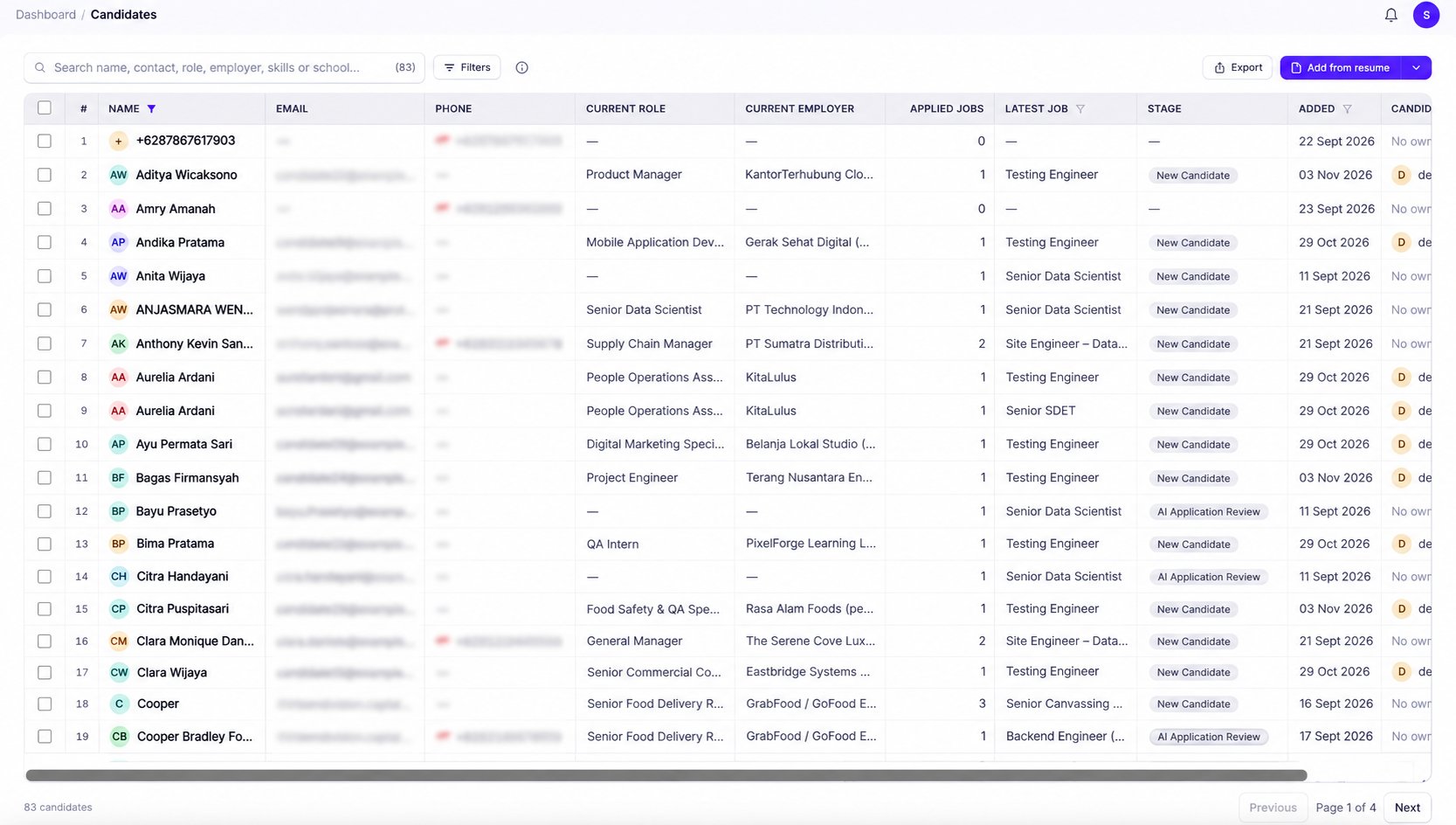
- Navigate to Candidates from the left sidebar under ATS.
- Browse all candidates stored in your database.
- Use the search bar or filters to find specific candidates.
- Click a candidate’s name to open their profile and view more details.
| Column | Description |
|---|---|
| Name | The candidate’s name. |
| The candidate’s email address. | |
| Phone | The candidate’s contact number. |
| Current Role | The candidate’s most recent or current job title. |
| Current Employer | The candidate’s current or most recent employer. |
| Applied Jobs | The number of jobs associated with the candidate. |
| Latest Job | The most recent job associated with the candidate. |
| Stage | The candidate’s recruitment stage for the displayed job. |
| Added | The date the candidate was added to KitaHQ. |
| Candidate Owner | The team member responsible for managing the candidate. |
Add Candidates to Your Database
KitaHQ supports multiple ways to add candidates to your database.- Upload Resumes: Click Add from Resume to create candidate profiles from uploaded resumes.
- Sourcing Extension: Capture candidates directly from LinkedIn and supported job platforms.
- Career Pages: Automatically collect applications submitted through your branded career page.
- Application Links: Share job application links and capture candidate information directly in KitaHQ.
Search and Filter Candidates
Use the search bar at the top of the Candidates page to find candidates by name, contact details, role, employer, skills, or education. You can also combine keywords with search operators such asAND, OR, and NOT to refine your results.
Click Filters to narrow down your candidate list using the available criteria.
View Candidate Profiles
Click a candidate’s name to open their profile and access more detailed information. Depending on the available data, candidate profiles may include:- Profile Summary: An overview of the candidate’s background.
- Work Experience: Previous positions, employers, and employment history.
- Education: Academic qualifications and educational background.
- Skills: Relevant skills and qualifications.
- Documents: Resumes and other uploaded files.
- Job Applications: Jobs associated with the candidate and their application progress.
- Notes: Internal feedback, conversations, and recruitment updates.